Rap Fame - Rap Music Studio
- 4.7
- Rating
- 10.00M
- Installs
- Free
- Price

 Analysis by App-foxy
I approached Rap Fame as someone who wanted to turn a rough lyric idea into an actual rap recording without first learning a full desktop production setup. That is the app’s strongest appeal: it brings recording, vocal effects, beat selection, and a social audience into one mobile experience. It is a free Music & Audio app from Rap Tech Studios, aimed at people who want to practice, publish, and improve rather than simply play songs in the background.
My first impression was that it feels more like a creative workspace with a community attached than a conventional music player. You can browse beats, record vocals, shape the sound, and share the result with other rappers and listeners. The scale is substantial, with over ten million installs, an average rating of 4.7, and a large number of ratings and reviews. Those figures suggest that the app has found a real audience, but they do not remove the need to learn its workflow. A beginner can make progress quickly, although the many creative choices can feel busy at first.
What the mobile studio is really like
The core experience is built around making rap tracks on a phone. Instead of opening a blank recording screen and expecting you to provide everything, the app gives you access to a broad beat library, vocal processing tools, and a place to share your work. That combination matters because a new user often gets stuck before recording: there is no instrumental, no idea how to make the voice fit, or no one to hear the finished attempt.
You May Also Like

 Blood Strike: 2.5 Anniversary
Blood Strike’s Loadouts Turn Every Drop Into a Tactical Gamble
A close look at Blood Strike’s custom loadouts: how fast access to signature weapons reshapes its battle royale rhythm, rewards preparation, and narrows the gap between fights.

 Pandora - Music & Podcasts
Pandora’s Music Is Easy to Start, but Harder to Recover
Pandora’s strength is its low-effort path from a seed to a station. Its weak spot is how much confidence it asks you to place in connection, setup, and quiet recovery.

 8 Ball Pool
 Is Built on Rivalries, Rematches, and Routine
A close look at the rivalries, rematches, shared routines, and unanswered safety questions that turn a quick pool match into a persistent mobile community.

 Samsung Music
’s Quiet Strength Is Playing What You Already Own
Its reach comes less from spectacle than from dependable access to a personal library. That simplicity is both the app’s strongest retention engine and its ceiling.

 AccuWeather: Weather Radar
AccuWeather Review: A Quick, Clear Forecast for Everyday Decisions
For everyday plans, the best forecast is the one you can understand quickly. AccuWeather makes rain timing, radar, and local conditions easy to act on, with a few trade-offs.

 Hill Climb Racing
Why Hill Climb Racing Still Turns Crashes Into One More Run
A tiny car, a bumpy hill and one more upgrade: Hill Climb Racing keeps resurfacing because its simple chaos makes every near-miss feel personal.
More From Our News Desk



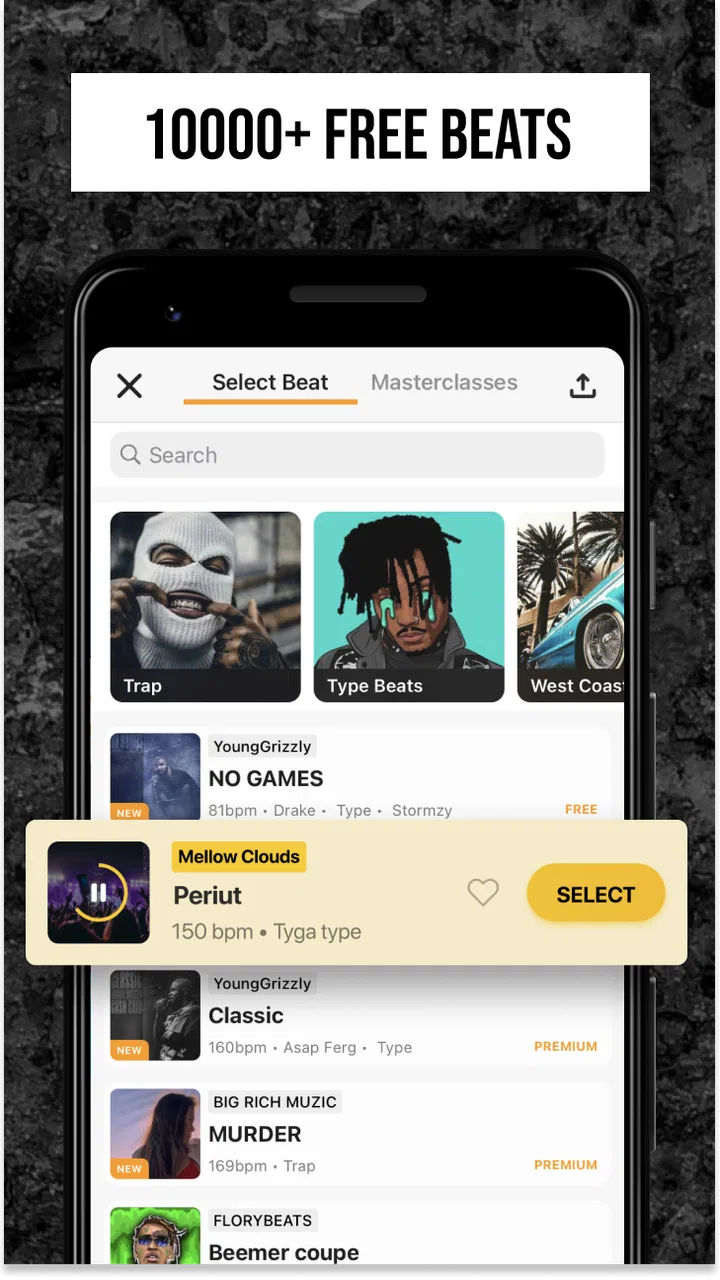
The beat collection is one of the most useful starting points. Having access to around ten thousand beats means I can search for a mood or rhythm before writing, rather than forcing every lyric onto the same backing track. The practical advantage is not just variety. Trying several beats can expose whether a verse needs shorter lines, more space between phrases, or a different flow. I found that choosing the instrumental first makes the writing stage more concrete.
The vocal effects are also more important than they may appear in a short store description. They can help a casual recording feel more intentional, especially when the raw phone microphone sound is thin or uneven. I would not treat them as a replacement for a quiet room, good microphone technique, or careful performance. They are best used to support a strong take, not to rescue a recording where the words are unclear or the timing is inconsistent.
The social side changes the motivation. The app connects creators with a network of rappers and fans, so publishing is not limited to saving a file privately on the phone. That can be encouraging for someone who wants feedback or simply wants a reason to finish a verse. It can also make the experience feel more public than a private practice app, which is worth considering if you prefer to experiment without an audience.
For a first-time user, the most realistic expectation is not instant professional production. I see this as a fast sketching and sharing tool: useful for capturing ideas, rehearsing delivery, making a presentable demo, and joining a rap-focused community. Someone who needs detailed multitrack engineering, advanced mixing control, or a full desktop-style production environment will probably outgrow it.
Who will get the most from it
I would recommend it to beginners who want a guided route from lyrics to recording. It also suits experienced rappers who need a portable place to test flows over different instrumentals. If you write while commuting, practice between classes, or regularly think of hooks away from your main setup, a phone-based studio can remove enough friction to make those ideas usable.
The app is especially helpful for people who are motivated by visible progress. Recording a verse, applying a suitable vocal treatment, and sharing it creates a clear finish line. That is more productive than endlessly collecting unfinished lyrics. The community can add another layer of accountability, although I would still judge feedback carefully rather than assuming every reaction is useful criticism.
I would be more cautious about recommending it to someone who only wants a simple voice recorder. The beat library, effects, and social functions are central to the experience, so they may feel unnecessary if your goal is just to capture spoken notes. It is also not my first choice for a producer who wants precise control over every instrument, automation detail, and mix parameter. In that situation, a dedicated digital audio workstation is likely the better tool.
Getting through the first setup without overthinking it
After installing it, I would begin with one narrow goal: make a short recording rather than explore every menu. The app is free to download, and its content rating is Teen, so it is positioned for a younger audience as well as adults. There are in-app purchases ranging from $0.99 to $400.00 per item, which makes it sensible to understand the free workflow before buying anything. I would not spend money during the first session; the early test should be whether the recording process suits you.
Start by choosing a beat that matches the energy of your lyrics. Do not select one only because it sounds impressive in isolation. A dense instrumental can hide a beginner’s delivery, while a more open beat leaves room for pronunciation and breath control. I usually listen for a section where the drums give me a clear entrance and where the hook has enough space to stand out.
Before recording, prepare a compact section of lyrics. A complete verse is not necessary for the first attempt. Eight or sixteen focused bars are enough to test whether the beat, writing, and vocal style belong together. I recommend marking the words where you want emphasis and noting where you need to breathe. This small preparation step prevents the common mistake of pressing record with a page of lyrics but no plan for delivery.
Use headphones if they are available. They make it easier to hear the beat while recording and reduce the temptation to raise your voice simply because the instrumental feels loud in the room. Keep the phone at a steady distance and speak toward it consistently. Moving closer for quiet lines and farther away for louder ones can make the take uneven, even before effects are applied.
The current version is 3.77.0 and supports Android 7.0 or later. That makes it accessible on many older Android devices, although the experience can still vary with the phone’s microphone, storage, and overall performance. I would close unnecessary apps before a serious take and keep the first recording short. If the app behaves smoothly with a brief test, then move on to a longer performance.
One useful beginner habit is to make two contrasting takes instead of trying to perfect one immediately. In the first, focus on clear words and staying on beat. In the second, add more attitude, ad-libs, or changes in emphasis. Comparing them helps reveal whether your performance improves through energy or simply becomes harder to understand. This is a better learning loop than applying effects randomly and hoping the result sounds finished.
The quickest route to a meaningful first result
My suggested first session is simple. Choose one beat, record a short verse, listen back once without changing anything, and then make one deliberate adjustment. That adjustment might be a different vocal effect, a calmer delivery, or a new take with more space between lines. The aim is to hear a clear improvement, not to create a perfect track in one sitting.
When selecting vocal effects, begin subtly. Strong processing can be exciting during the first few seconds but may cover consonants or make the voice tiring to hear. I prefer to compare the untreated or lightly treated vocal with a more stylized version. If the words become less intelligible, the effect is working against the track, even if it sounds dramatic.
Listening back is where the app becomes more than a beat player. I pay attention to three things: whether the first line starts confidently, whether the flow stays aligned with the instrumental, and whether the hook sounds different enough from the verse. These checks are practical and do not require technical mixing knowledge. They also tell you what to change on the next take.
A realistic everyday use case would be writing a hook during a lunch break. I might open the beat library, test a few instrumentals, choose one with enough room for the melody, and record a rough version before returning to work. Later, I could revisit the idea, improve the wording, and share a cleaner take. The value is not that the lunch-break recording becomes a finished single; it is that the idea survives long enough to be developed.
Another useful workflow is to use the app as a rehearsal mirror. Record the same verse over two different beats and compare how your cadence changes. If one instrumental makes you rush every line, that may reveal a writing problem or simply a poor beat match. This experiment helps separate weaknesses in the lyrics from weaknesses in the arrangement, which is an insight a basic recorder would not provide.
For social sharing, I would publish only after checking the beginning and ending. A strong middle section can be undermined by a hesitant opening or an abrupt finish. Even a short introduction before the first bar can make a recording feel more intentional, while ending cleanly avoids the impression that the take stopped by accident. These details matter when listeners are deciding whether to continue.
Where beginners commonly get confused
The first source of confusion is the difference between finding a beat and finding the right beat. A large library can create choice overload. I recommend narrowing the search by mood, pace, and the amount of space your voice needs, then stopping once you have a workable candidate. Constantly switching instrumentals can become a way of avoiding the harder task of finishing lyrics.
The second issue is expecting vocal effects to solve performance problems. Effects can change tone and atmosphere, but they cannot reliably correct late entrances, swallowed words, or a verse that does not fit the rhythm. If the recording sounds muddy, I would first redo the take with clearer diction and a steadier phone position. Only after that would I adjust the vocal treatment.
New users may also wonder whether they need to pay before they can make anything worthwhile. Since the app is free and includes a substantial creative foundation, I would explore the basic recording and sharing path first. The presence of optional purchases means you should read each purchase screen carefully and decide whether an upgrade solves a problem you actually have. Buying tools before understanding your own workflow usually adds clutter rather than progress.
The community can create a different kind of uncertainty. A network of rappers and fans is useful when you want discovery or reactions, but public feedback is not the same as structured coaching. Some comments may focus on taste, personality, or popularity instead of timing and writing. I would look for repeated, specific observations and use them as prompts for another take, not as absolute judgments about your ability.
Privacy and confidence are practical concerns for any social recording app. If you are still developing your style, begin with a small audience or treat early uploads as experiments, depending on the sharing controls available in your account. I would avoid posting lyrics or performances that I would regret making public while still learning how the community works. The best first milestone is a recording you are comfortable hearing again, not immediate attention.
There is also a difference between making a demo and producing a release-ready master. A mobile recording can be effective for testing a concept, showing a collaborator your direction, or building a personal catalog of ideas. A polished commercial release may require more detailed editing and mixing elsewhere. Knowing that boundary prevents disappointment and helps you use the app for what it does well.
How it compares with ordinary alternatives
Compared with a standard voice recorder, this app gives the performance a musical context from the beginning. You can test flow against beats and shape the voice rather than merely storing dry audio. That makes it far more useful for rappers, but less convenient for someone who wants quick spoken notes with no creative setup.
Compared with a general music-making app, its focus is narrower and more helpful if rap is your main interest. The beat-centered workflow and rap community reduce the need to build an environment from unrelated instruments or genres. The trade-off is flexibility: a broader production app may offer deeper control over composition, arrangement, and mixing, while this one gets you to a vocal idea faster.
Compared with recording on a computer, the phone workflow wins on immediacy. I can capture a thought wherever I am instead of waiting until I reach a desk. The computer still wins when I need precise edits, extensive track layering, or serious final mixing. For me, the sensible approach is not to treat the two as rivals. Rap Fame works well as the place where a concept begins and a more advanced setup can take over when the concept proves itself.
Its social layer also separates it from private studio software. A traditional workstation may be better for control and privacy, but it does not automatically put a rap-focused audience around the recording. Here, sharing can make finishing more rewarding. The downside is that the creative process may feel less private and more dependent on reactions, so users should decide whether community energy or uninterrupted concentration matters more to them.
Turning the first recording into a repeatable routine
Once the first take works, I would avoid jumping immediately into complicated experimentation. Save a simple routine: select a beat, write a compact section, record a clean take, try one effect, listen back, and note one change. Repeating this sequence builds a useful reference point. You begin to recognize which beats suit your voice and which effects consistently make your delivery less clear.
A good next step is to record the same lyrics with different emphasis rather than different words. Put the stress on the final word of each line in one take, then use a more conversational delivery in another. This exposes the relationship between writing and performance. It also gives you material to compare when deciding whether a hook needs stronger wording or simply a more memorable delivery.
I would also keep a small list of beats that inspire complete ideas. The most attractive instrumental is not always the most productive one. A beat that helps you finish a verse is more valuable than one you replay for a minute but never write to. This personal shortlist gradually turns the large library from a source of distraction into a practical writing resource.
For users who want to share regularly, consistency matters more than trying to make every upload elaborate. A short, clear performance can communicate more than a longer recording overloaded with effects. I would publish when the words are understandable, the timing is stable, and the track has a clear beginning and ending. Then I would use reactions as one input among several, alongside my own listening and notes.
It is worth remembering that the app is rated Teen, so younger users and parents may want to consider the social nature of publishing and listening alongside the creative tools. The app’s audience includes both rappers and fans, which can be motivating, but any public creative space requires sensible judgment about what to share and how to respond to others.
Rap Tech Studios has kept the product centered on a recognizable idea: make rap recording approachable on a mobile device and connect the result with people who enjoy the same form. That focus is why I find it more convincing than an overloaded all-purpose audio app for a beginner rapper. It does not remove the need to practice, but it shortens the distance between an idea and a hearable demo.
My final recommendation is straightforward. Try it if you want beats, vocal experimentation, and a rap-oriented community in one place, especially if the thought of opening a complex desktop studio stops you from recording. Start with a short verse and one controlled effect, then judge the app by how easily it helps you finish a second take. The real strength is not instant perfection; it is making the first meaningful recording feel achievable.
I would skip it if you only need a basic recorder, dislike social sharing, or require detailed professional mixing from the start. For everyone else, the free entry point makes experimentation reasonable, while the optional purchases are best considered only after you know which part of your workflow needs more. In my experience, the app is at its best when I use it as a fast, focused rap sketchbook that can also become a place to share finished ideas.
FAQs for Rap Fame - Rap Music Studio
01What features does Rap Fame offer for aspiring rappers?
Rap Fame provides a comprehensive set of tools for aspiring rappers, including a multi-track recording studio, sound effects, and vocal filters. Users can access a vast library of beats, collaborate with other artists, and share their tracks within the community. The app also offers a platform for competitions and feedback from fellow musicians.
02Is Rap Fame suitable for beginners with no experience in music production?
Yes, Rap Fame is designed to be user-friendly for beginners. It offers tutorials and an intuitive interface that helps users create professional-sounding tracks without prior experience. The app's community and feedback features can also help new users learn and improve their skills over time.
03Are there any costs associated with using Rap Fame?
Rap Fame is free to download and use, but it offers in-app purchases and a premium subscription. These paid options provide access to additional beats, vocal effects, and advanced features. While the free version is feature-rich, the premium version enhances the user experience significantly for serious artists.
04How does the Rap Fame community enhance the app experience?
The Rap Fame community is a vibrant network of artists where users can share their tracks, receive feedback, and participate in rap battles. This interaction not only helps artists improve but also provides exposure and the opportunity to connect with like-minded individuals across the globe. The competitive aspect adds excitement and a sense of achievement.
05What devices are compatible with Rap Fame?
Rap Fame is available for both Android and iOS devices. It supports a wide range of smartphones and tablets, ensuring that users can create music on the go. Regular updates ensure compatibility with the latest operating systems, providing a smooth user experience across different devices.
Pros
- User-friendly interface for beginners.
- Large community for collaboration.
- Wide variety of beats available.
- High-quality audio recording.
- Regular updates with new features.
Cons
- Limited free features without subscription.
- App contains frequent ads.
- Occasional crashes reported by users.
- Requires internet for most functions.
- Premium features can be pricey.

Rap Fame - Rap Music Studio
Gallery